Advanced Bioimage Analysis in Python (ABAP01)
Learn advanced bioimage analysis in Python. Explore cell segmentation, deep learning, image registration and reproducible microscopy workflows.
 Duration: 4 Days, 4.5 hours per day
 Next Date: June 7-10, 2027
 Format: Live Online Format
UK (GMT+1) local time - All sessions will be recorded and made available to ensure accessibility for attendees across different time zones.
£400Registration Fee
Register NowLike what you see? Click and share!


- Overview
- Instructors
- Schedule
Course Description
This course provides a comprehensive, hands-on introduction to advanced bioimage analysis using Python. Designed for researchers, bioinformaticians, and imaging scientists who already work with microscopy data, the course combines conceptual foundations with practical, hands-on sessions. Each topic is introduced through its underlying principle — what problem it solves, when to use it— followed by guided exercises on microscopy data.
Participants will learn to read and interpret complex microscopy formats through Bio-Formats, build scalable and lazy processing pipelines with Dask, and apply modern segmentation, spot detection, and registration methods to extract quantitative measurements from cells and tissues.
By the end of the course, participants will be able to:
- Load and navigate multidimensional microscopy data with correct axes, calibration, and metadata.
- Segment cells and detect spots using deep-learning methods.
- Align images from different sources.
- Extract single-cell features.
- Prototype analysis pipelines with dask.
- Package analyses scripts and deploy them as installable tools or via containers.
The course follows four steps: (1) accessing data efficiently, (2) analyzing it quantitatively, (3) aligning it spatially, and (4) deploying complex image-analysis workflows in a more reusable and reproducible way.
What You’ll Learn
- Bio-Formats and multidimensional microscopy data.
- Cell segmentation methods: Cellpose, StarDist and DeepCell.
- Spot detectin methods.
- Customizing your single-cell features and its extraction.
- Image registration and stitching.
- Lazy operations and task orchestration with dask.
- Tool deployment: Python project layout and containerization.
- Task parallelization and queues.
Course Format
Interactive Learning Format
Each day features a well-balanced combination of lectures and hands-on practical exercises, with dedicated time for discussing participants’ own data, time permitting.
Global Accessibility
All live sessions are recorded and made available on the same day, ensuring accessibility for participants across different time zones.
Collaborative Discussions
Open discussion sessions provide an opportunity for participants to explore specific research questions and engage with instructors and peers.
Comprehensive Course Materials
All code, datasets, and presentation slides used during the course will be shared with participants by the instructor.
Personalized Data Engagement
Participants are encouraged to bring their own data for discussion and practical application during the course.
Post-Course Support
Participants will receive continued support via email for 30 days following the course, along with on-demand access to session recordings for the same period.
Who Should Attend / Intended Audiences
This course is designed for researchers, technical staff, bioinformaticians, and other professionals who regularly work with biological images and wish to develop their skills in advanced bioimage analysis. Participants should have a basic understanding of image analysis and processing, along with practical experience using Python and libraries such as NumPy and scikit-image. Familiarity with Conda environments, GitHub, and the command-line interface (CLI) is also expected.
Equipment and Software requirements
A laptop or desktop computer with at least 32Gb of RAM.
A working webcam is recommended to support interactive elements of the course. We encourage participants to keep their cameras on during live Zoom sessions to foster a more engaging and collaborative environment.
While not essential, using a large monitor or ideally a dual-monitor setup can significantly enhance your learning experience by allowing you to view course materials and work in R simultaneously.
Participants are expected to have functioning installations of Python and Jupyter Notebook, along with Conda or Miniforge for managing Python environments. A GitHub account is also required to access and work with course materials. Additional required software includes Fiji (ImageJ with additional plugins and tools, download here) and Napari (installation instructions). All software should be installed and functioning before the course begins.
Download R Download RStudio Download Jupyter Download Zoom Download Python

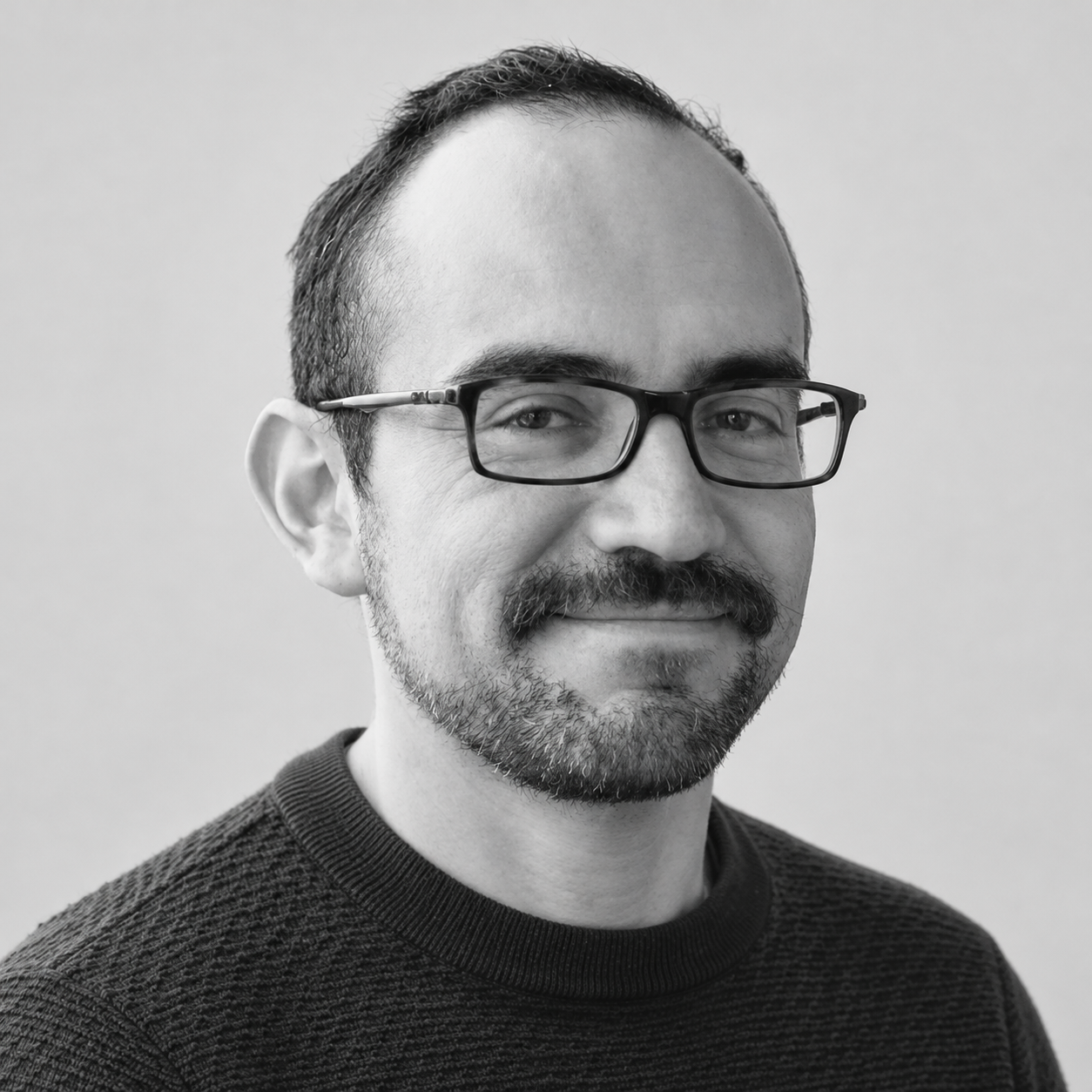
Dr. Victor Perez Meza
Victor is an image processing and analysis specialist, focused on fluorescence microscopy images from diverse acquisition sources. Over the last three years, he has been dedicated to the multidisciplinary field of multiplexed imaging, providing support to researchers to optimize their processing workflows, understand and correct image artifacts, and integrate images from multiple sources.
Education & Career
- PhD (Reduction of image reconstruction artifacts in super-resolution microscopy)
- MSc in Biophysics
- BSc in Physics
Session 1 – 02:00:00 – How can we analyze and inspect large microscopy datasets without reading everything into memory?
How can we organize our complex workflows with dask? In this first session, you’ll learn how to work with large, multidimensional microscopy images in Python without being limited by memory. We’ll look at how image axes and metadata are organized, how to read many vendor and community file formats with Bio-Formats, and how to process images lazily in chunks with Dask. We’ll also cover task orchestration as one of the session topics, and you’ll learn to build orchestrated pipelines—so you can assemble data I/O, preprocessing, and analysis functions into workflows.
Break – 00:30:00
Session 2 – 02:00:00 – Practical session.
Session 3 – 02:00:00 – How do we convert microscopy images into quantifiable cell-level measurements?
In this session, you’ll learn how deep learning helps answer that question. We’ll introduce popular segmentation tools—Cellpose, StarDist, and DeepCell Mesmer—and, for the trainable ones, show how to train them on your own data. You’ll then explore spot detection algorithms and build single-cell tables beyond mean intensity and shape, e.g. adding spot counts and/or marker positivity per cell. By the end, you’ll have a practical workflow from raw images to rich cell-level data.
Break – 00:30:00
Session 4 – 02:00:00 – Practical session.
Session 5 (Theory) – Duration: 2 hrs – How do we align images across tiles, acquisition rounds, or imaging modalities to expand what we can measure?
In this session, you’ll learn two core alignment techniques: image stitching to combine adjacent tiles into a single larger field of view, and registration to align the same specimen imaged under different conditions. Using ITK-based tools, you’ll practice stitching as well as rigid and deformable registration. By the end, you’ll know how to turn fragmented or mismatched images into coherent, analysis-ready datasets.
Break – 00:30:00
Session 6 – 02:00:00 – Practical session.
Session 7 (Hands-on) – Duration: 3 hrs – How do we turn our analysis workflows into software that others can install, run, and reuse?
In this hands-on session, you’ll turn loose functions into pipeline modules and give your project a clear file layout others can navigate. Then packaging: the files that let someone install your tool and its dependencies on any machine in one step. Finally, containerization: bundling your tool with its environment so it runs identically across machines—improving reproducibility and portability. By the end, you’ll have the pieces to turn exploratory code into a shareable, reproducible tool.
Testimonials
PR Stats offers a great lineup of courses on statistical and analytical methods that are super relevant for ecologists and biologists. My lab and I have taken several of their courses—like Bayesian mixing models, time series analysis, and machine/deep learning—and we've found them very informative and directly useful for our work. I often recommend PR Stats to my students and colleagues as a great way to brush up on or learn new R-based statistical skills.
Rolando O. Santos
PhD Assistant Professor, Florida International University

Courses attended
SIMM05, IMDL03, ITSA02, GEEE01 and MOVE07
Testimonials
PR Stats provided excellent training in stable isotope analysis through the SIMMPR course, which was incredibly valuable for my research. I was fortunate to attend the course through a generous fee waiver, which directly supported my work and enabled me to develop skills that contributed to my recent publication on reservoir food webs in Sri Lanka. I’m very grateful for the opportunity and support, and would highly recommend their courses to others working in ecological research.

Subodha Silva
Aquatic Ecology Researcher
Courses attended
SIMMPR
Testimonials
PR Stats has become an invaluable part of developing my skills in advanced statistical and spatial analysis. Through training in areas such as Bayesian statistics and Species Distribution Modelling, I’ve gained both practical expertise and exposure to leading experts in the field. The impact on my research has been significant with at least four of my published papers have been directly influenced by PR Stats courses. My most recent work benefitted from modelling advice on sample design and model accuracy evaluation and can be seen here.
Carlos P.E. Bedson
Quantitative Spatial Ecology, Ecology and Environment Research Centre, Manchester Metropolitan University, United Kingdom
Courses attended
ADVR08, ENMR03, BMIN02, ISBD01, BADA01, SDMB06
Frequently asked questions
Everything you need to know about the product and billing.
When will I receive instructions on how to join?
You’ll receive an email on the Friday before the course begins, with full instructions on how to join via Zoom. Please ensure you have Zoom installed in advance.
Do I need administrator rights on my computer?
I’m attending the course live — will I also get access to the session recordings?
I can’t attend every live session — can I join some sessions live and catch up on others later?
I’m in a different time zone and plan to follow the course via recordings. When will these be available?
I can’t attend live — how can I ask questions?
Will I receive a certificate?
When will I receive instructions on how to join?
You’ll receive an email on the Friday before the course begins, with full instructions on how to join via Zoom. Please ensure you have Zoom installed in advance.
Do I need administrator rights on my computer?
I’m attending the course live — will I also get access to the session recordings?
I can’t attend every live session — can I join some sessions live and catch up on others later?
I’m in a different time zone and plan to follow the course via recordings. When will these be available?
I can’t attend live — how can I ask questions?
Will I receive a certificate?
Still have questions?
Can’t find the answer you’re looking for? Please chat to our friendly team.